Teaching you how to write blog
Editor
Hi! welcome to the new blog where I tried to rewrite everything using react js so that I can put crazier logic to my blog posts. In this section I'll teach you how to blog and how my setup is.
First of all, I type everything using Typora. It's a What You See is What You Get (WYSIWYG) markdown editor. The cool feature about Typora is it's easy for you to do text formatting. The user interface of Typora is also clean, and not bloated.
There are some cool features that I use.
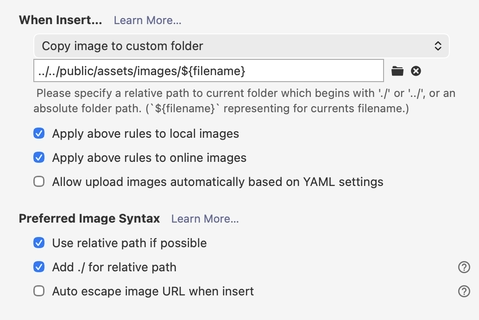
This is good because you can simply copy and paste images, and it will show up easily in your dedicated folder, depends on what kind of blog templates you are using, but I vibecoded my own blog website! Haha
Anyway, and just like that. You can start writing! Now let me talk about how to optimize images and animated pictures in your blog posts.
I use the avif format for images and animated images, for the animated images, they are basically just av1 (a video codec format) coded images in HEIF image container lolol. They are superior in quality and size.
When blogging, I'm also using Grammarly. It's a very good tool to correct my English, and I'm confident that my English has significantly improved ever since I started blogging recently.
Bottom is AI-assisted part. It's written by me but the informations are heavily assisted from a web-browsing enabled AI agent. if you don't like it, please refrain from reading it.
Since we're talking about blogging and dealing with images (like that .avif screenshot above), let's take a detour and actually understand what all these media formats mean. When you are downloading pirated movies, you'll come across MKV files, MP4 files, and so many other video codecs. Do formats represent video size? what is codecs? How does everything work?
Video Codecs
A codec stands for coder-decoder. It's the algorithm that compresses raw video into a smaller file and decompresses it when you play it back. Raw video is absurdly large, a single second of uncompressed 1080p video at 30fps is roughly ~180 MB. Nobody wants to stream that. So codecs use clever math tricks to shrink it down. Basically, it's just zip, but for media and faster decoding process.
The core idea behind almost all video codecs boils down to eliminating redundancy:
- Spatial redundancy — within a single frame, nearby pixels tend to look similar (e.g., a blue sky). Instead of storing every pixel, describe the pattern. In easy terms, think of floodfilling a single picture from a video.
- Temporal redundancy — consecutive frames are often nearly identical. Instead of storing every frame fully, store only what changed between frames. In easy terms, I usually call this delta.
H.264 (AVC) — The Old Reliable
Released in 2003, H.264 (also called AVC, Advanced Video Coding) is the codec that made internet video practical. YouTube, Netflix (early days), Blu-ray — all H.264.
How it works (layman version):
- Each frame is split into macroblocks (small squares, typically 16×16 pixels).
- There are three frame types:
- I-frames (Intra) — a full snapshot, compressed like a JPEG. These are your "keyframes."
- P-frames (Predicted) — stores only the difference from a previous frame. "This block moved 3 pixels to the right."
- B-frames (Bi-directional) — stores differences from both a past and a future frame, giving even better compression.
I-----------P-----------P
      B
   B     B
 B  B  B  B
The I frame is available first, and then P is decoded based on I, and then there's bisection
- Within each block, it applies a Discrete Cosine Transform (DCT) — Similar to Fourier transform, it basically has signals
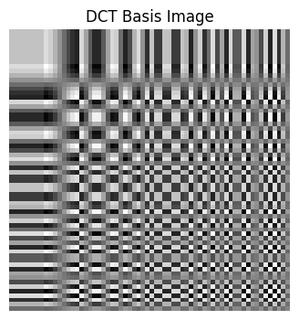
Getting the coefficient for this base, you'll obtain the coefficient form of the original image
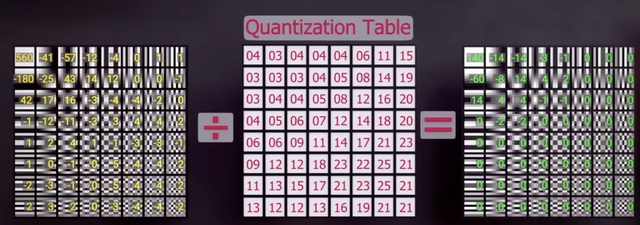
If you think about it, the lower left corners are basically a better fitting for the signal to reconstruct the original image. So people are betting if we could just ignore those by dividing it with a bigger constant. After that, we got a new matrix with bunch of zeroes, which is easier to compress.
TL;DR: Split frame into blocks → predict from nearby frames → transform to frequencies → throw away what humans can't see → compress the remainder with statistics.
Status: Still universally supported. Hardware decoding on basically every device made in the last 15 years. It's the "JPEG of video."
H.265 (HEVC) — The Successor That Got Complicated
Released in 2013, H.265 (HEVC, High Efficiency Video Coding) aimed to deliver the same quality at ~50% the bitrate of H.264.
How it works (layman version):
It uses the exact same philosophy as H.264 but with more flexible tools:
- Instead of fixed 16×16 macroblocks, it uses Coding Tree Units (CTUs) that can be up to 64×64 pixels and recursively subdivide into smaller blocks. Big uniform areas (sky) → use big blocks. Detailed edges → use tiny blocks.
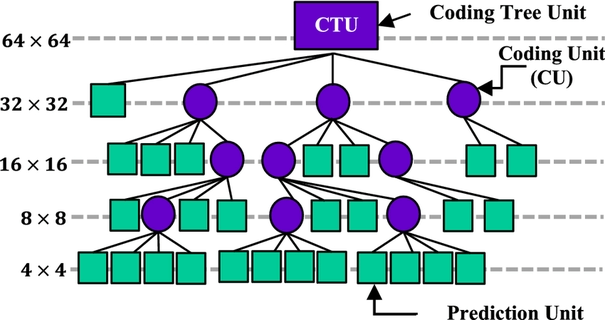
- Better motion prediction — more directions, more reference frames, more precision.
- Better in-loop filters — specifically a Sample Adaptive Offset (SAO) filter that reduces banding and ringing artifacts.
- Improved entropy coding.
The catch: HEVC is a patent minefield. Multiple patent pools (MPEG LA, HEVC Advance, Velos Media) all demand licensing fees, and they don't always agree on terms. This fragmented patent situation slowed adoption dramatically.
Status: Widely used in 4K Blu-ray, Apple ecosystem (iPhones record in HEVC by default), and streaming. But the patent mess directly motivated the creation of AV1.
AV1 — The Open, Royalty-Free Future
Released in 2018 by the Alliance for Open Media (AOM) — whose members include Google, Apple, Meta, Amazon, Netflix, Microsoft, Mozilla, and others. AV1 is royalty-free, which is a massive deal.
How it works (layman version):
AV1 builds on Google's VP9 codec and takes the same ideas even further:
- Superblocks up to 128×128 pixels, with even more flexible recursive partitioning (10+ partition types, not just quad-tree like HEVC). So each of the block's partitions have types.
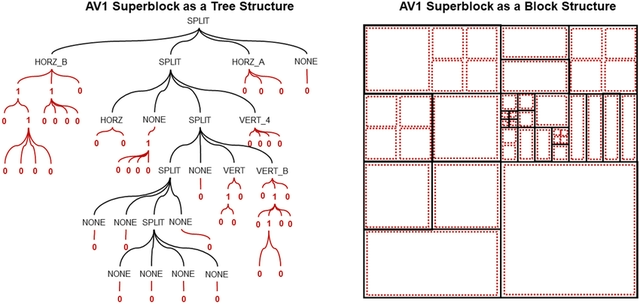
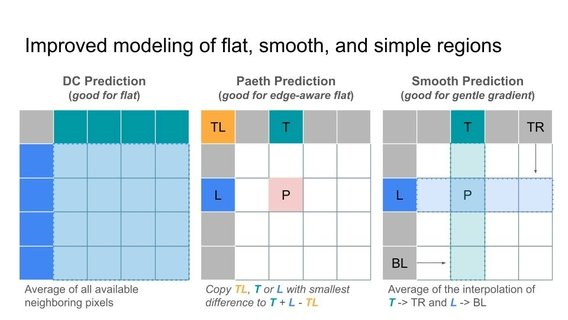
- Advanced prediction modes — it has stuff like:
- Paeth prediction — predicts a pixel by looking at the top, left, and top-left neighbors and picking the one closest to a computed value. Borrowed from PNG!
- Compound inter-prediction — blend predictions from two reference frames together instead of picking one.
- Warped motion — instead of just translation (block moved left/right/up/down), it can model rotation, zoom, and shear.
- CDEF (Constrained Directional Enhancement Filter) — a smart deblocking filter that understands edge directions.
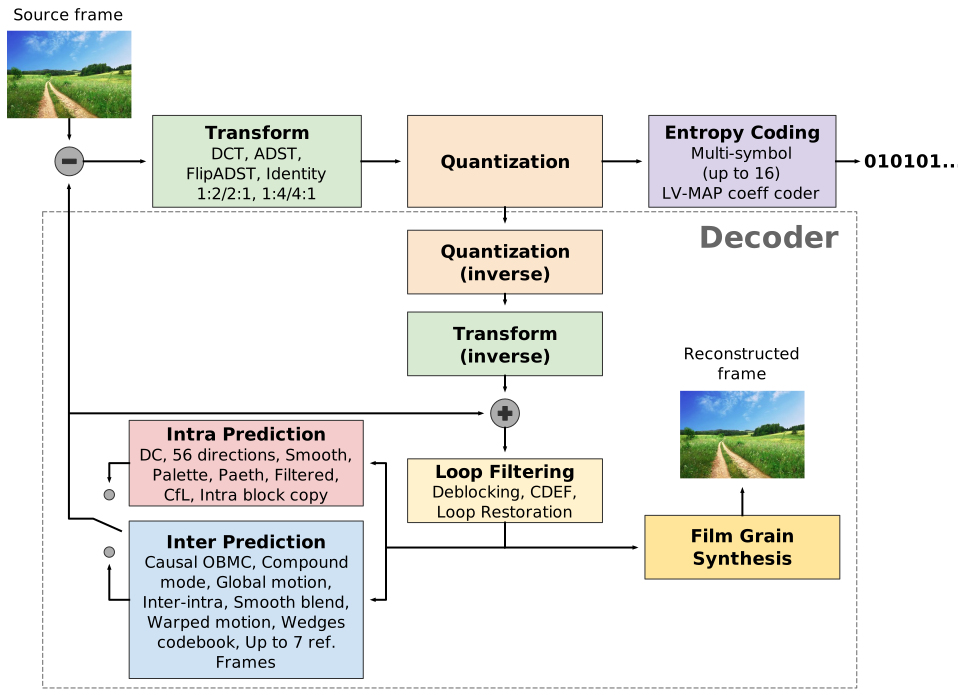
- Film grain synthesis — instead of wasting bits encoding noisy film grain, strip the grain during encoding, transmit a description of the grain pattern, and re-synthesize it during playback. This alone saves a shocking amount of bitrate on grainy content.
- Symbol-level multi-ANS entropy coding for better compression of the final bitstream.
Performance: ~30-50% better compression than H.265 at the same quality. Encoding is very slow (5-10x slower than H.265), but decoding is reasonable.
Status (2026): Hardware decode support is now widespread — Intel (12th gen+), AMD (RX 7000+), Apple (M3+), Qualcomm (Snapdragon 8 Gen 2+), Samsung (Exynos 2400+), and MediaTek chips all have AV1 hardware decoders. YouTube, Netflix, and Twitch all use AV1 for streaming. Hardware encoding is catching up too — Intel Arc and NVIDIA RTX 40-series have AV1 hardware encoders. AV1 is effectively the standard for new deployments now.
Quick Comparison Table
| Feature | H.264 (2003) | H.265 (2013) | AV1 (2018) |
|---|---|---|---|
| Max block size | 16×16 | 64×64 | 128×128 |
| Compression (relative) | 1× | ~2× | ~2.5-3× |
| Royalty-free? | No (but cheap/widely licensed) | No (expensive, fragmented) | Yes |
| Hardware decode support | Universal | Wide | Growing rapidly |
| Encoding speed | Fast | Medium | Slow |
Video Containers
Here's a distinction that confuses everyone at first:
A codec is the algorithm that compresses/decompresses video. A container is the file format that packages the compressed streams together.
A video file typically contains:
- A compressed video stream (e.g., H.264, AV1)
- One or more compressed audio streams (e.g., AAC, Opus)
- Subtitles (e.g., SRT, ASS)
- Metadata (title, chapters, timestamps, etc.)
The container is like a shipping box — it holds all these items together and provides an index so your player knows where each stream starts/ends and how to sync them.
Common Containers
| Container | Extension | Notes |
|---|---|---|
| MP4 (MPEG-4 Part 14) | .mp4 | The universal container. Supports H.264, H.265, AV1, AAC, etc. Great for web. |
| MKV (Matroska) | .mkv | The "kitchen sink" container — supports virtually every codec ever made. Popular for archival and piracy. Not natively supported in all browsers. |
| WebM | .webm | Google's container, a subset of MKV. Designed for VP8/VP9/AV1 + Vorbis/Opus. Native browser support. |
| MOV (QuickTime) | .mov | Apple's container. Similar capabilities to MP4 (they share lineage). |
| AVI | .avi | Ancient Microsoft container (1992). Limited, no modern codec support. Basically legacy. |
| TS (MPEG Transport Stream) | .ts | Used in broadcast TV and HLS streaming. Designed to be robust against transmission errors. |
Key point: The same H.264 video can be stuffed into an .mp4, .mkv, .mov, or .ts container. The video quality is identical — only the packaging changes.
Image Formats
Now let's talk about the image formats, which matters directly for blogging since every image you embed is a choice.
PNG — Pixel-Perfect, But Chonky
PNG (Portable Network Graphics, 1996) uses lossless compression. Every single pixel is preserved exactly.
How it works (layman version):
- Filtering — for each row of pixels, PNG applies a filter that encodes each pixel as the difference from its neighbor (left, above, upper-left, or combinations). Since neighboring pixels are usually similar, the differences are mostly small numbers and zeros — which compress really well.
- DEFLATE compression — the filtered data is compressed using DEFLATE (the same algorithm behind ZIP and gzip). DEFLATE combines:
- LZ77 — finds repeated sequences and replaces them with back-references ("same as 200 bytes ago, for 15 bytes").
- Huffman coding — assigns shorter bit-patterns to frequently occurring values.
Best for: Screenshots, text, UI elements, diagrams, anything with sharp edges and flat colors. Also anything where you need transparency (alpha channel).
Weakness: Terrible for photographs. A photo PNG can easily be 5-10× larger than a JPEG of comparable visual quality.
WebP — Google's Hybrid
WebP (2010, Google) supports both lossy and lossless compression, plus transparency and animation.
- Lossy WebP is based on VP8 video codec's intra-frame coding (essentially: one frame of VP8 video). It uses variable-size block prediction (4×4 and 16×16), Walsh-Hadamard Transform, and boolean arithmetic coding. Compared to JPEG, it has better prediction and no fixed 8×8 block boundary artifacts.
- Lossless WebP uses a completely different approach: spatial prediction + color transforms + LZ77-based backward references + Huffman coding + a color cache. The color cache is neat — it keeps a palette of recently used colors for back-referencing.
Performance: ~25-35% smaller than JPEG at equivalent quality (lossy). ~25% smaller than PNG (lossless).
Status: Universally supported in all modern browsers since ~2020. A safe choice for web.
AVIF — The New Hotness
AVIF (AV1 Image File Format, 2019) is literally a single frame of AV1 video stuffed into a HEIF container. All the advanced compression tech from AV1 applied to still images.
How it works (layman version):
All the tricks from AV1 described above — huge flexible block sizes, advanced prediction modes, warped motion compensation (useful for repeating textures), better transforms, film grain synthesis — but for a single image.
Key advantages:
- Both lossy and lossless modes
- Transparency (alpha channel)
- HDR and wide color gamut support (10- and 12-bit depth)
- Incredible compression — typically 30-50% smaller than WebP and 50-70% smaller than JPEG at equivalent visual quality
Animated Images: The GIF Killer Era
I was trying to embed animated images in my blog as well.
The GIF Problem
GIF (1987) has been the go-to for animated images for literally decades. But GIF is awful by modern standards:
- Limited to 256 colors per frame (8-bit palette). Gartic phone vibe.
- Lossless only within those 256 colors — so you get the worst of both worlds: bad quality AND big files.
- No alpha transparency — just binary on/off transparency (a pixel is either fully visible or fully invisible, no semi-transparent gradients).
- No modern compression whatsoever. Uses LZW from the 1980s.
A 5-second GIF can easily be 10-20 MB. The same content in modern formats? A fraction of that.
WebP Animation
WebP supports animation natively and it was one of the first real contenders to kill GIF:
- Full 24-bit color (16.7 million colors) instead of GIF's 256
- Lossy AND lossless animation
- Proper alpha transparency with 8-bit alpha channel (smooth semi-transparent edges!)
- Typically 50-70% smaller than equivalent GIF
- Uses VP8 (lossy) or WebP lossless coding per frame, with inter-frame compression
Animated WebP is essentially "what if we took a VP8 video and shoved it into an image container that loops." Because that's... basically what it is.
AVIF Animation — The Absolute GOAT
Okay, here's where AVIF goes absolutely stupid hard.
Animated AVIF (also called AVIS, AVIF Sequence) is literally just an AV1 video stream in a HEIF container, except it behaves like an image — loops automatically, no play button, auto-plays inline, works in <img> tags.
Let that sink in. You're getting full AV1 video compression — the same tech Netflix uses to stream 4K content to millions of people — but it shows up like a GIF in your browser.
Remember how AV1 has all those insane tools? Warped motion, compound prediction, film grain synthesis, 128×128 superblocks? All of that applies to each frame of your animation.
A comparison for a typical 5-second animation clip:
| Format | Approximate Size | Quality |
|---|---|---|
| GIF | 15 MB | 💀 256 colors, dithered mess |
| Animated PNG (APNG) | 12 MB | Good, but huge |
| Animated WebP | 3-4 MB | Good |
| Animated AVIF | 1-2 MB | Best |
We're talking ~90% smaller than GIF at significantly better quality. That's not a typo.
Honestly, the cleanest way to think about it:
GIF       = slideshow of 256-color palettized frames
APNG      = slideshow of full PNG frames
WebP Anim = VP8 video pretending to be an image
AVIF Anim = AV1 video in a trenchcoat pretending to be an image
And since AV1 is the most advanced production video codec on the planet, AVIF animation inherits all of that power for free.
It's like bringing a fighter jet to a bicycle race.
And that is probably way more than you ever wanted to know about media formats. But hey, now when someone asks why your blog images are .avif, you can give them a 20-minute lecture they didn't ask for. 😄